
Billing Software for Restaurants: Free 7-Day Trial QPOS
Written by: Stephen Athokpam, POS Software and Retail Systems Specialist , QPOS
Published: 24 August 2026
Table of Contents
Managing a restaurant involves much more than taking orders and collecting payments.
Restaurant owners need to manage billing, orders, tables, inventory, staff, customers, and daily sales with a smooth dining experience.
Traditional billing methods are time-consuming, which leads to errors, especially during busy hours. A Restaurant Billing Software can help streamline these operations by bringing essential billing and restaurant management functions together in one system.
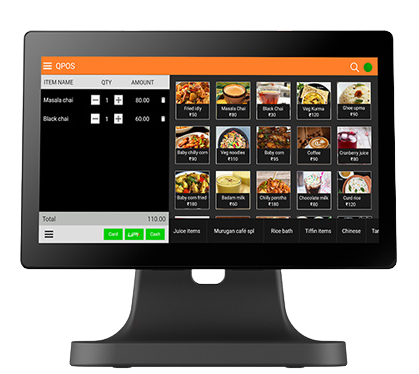
QPOS is one such restaurant billing software designed to help businesses simplify billing, manage orders efficiently, and gain better control over their day-to-day operations.
If you are looking for a solution before making a long-term commitment, QPOS offers a free 7-day trial to explore its features and suitability for your restaurant.
What Is Restaurant Billing Software?
Restaurant billing software is a digital solution that helps restaurants manage billing and related operations from a centralized system.
Instead of relying on manual bills or separate systems, restaurant staff can use the software to create orders, generate bills, process payments, and track sales.
Depending on the solution, restaurant billing software can also support functions such as table management, inventory management, customer management, reporting, and integrations with other restaurant systems.
Why Do Restaurants Need Billing Software?
As restaurant operations expand and become more complex, manual billing create unnecessary challenges.
Some common problems include:
- Manual calculation errors
- Slow bill generation during peak hours
- Difficulty tracking daily sales
- Limited visibility into restaurant performance
- Challenges managing multiple tables and orders
- Difficulty monitoring inventory
- Time-consuming reporting
- Lack of centralized business information
A dedicated billing system can help automate repetitive tasks and provide restaurant owners and staff with better operational visibility.
QPOS Restaurant Billing Software – Key Features
QPOS brings essential restaurant billing and management capabilities together to help improve efficiency.
Feature | How QPOS Helps? |
Fast Billing | Generate customer bills quickly and reduce waiting time. |
Order Management | Manage customer orders more efficiently from the billing system. |
Table Management | Keep track of tables and their current order status. |
Payment Management | Handle different payment methods more conveniently. |
Sales Reports | Monitor sales and understand daily business performance. |
Inventory Management | Track stock and improve control over inventory. |
Customer Management | Maintain customer information and support better customer engagement. |
User Management | Help manage access and restaurant staff operations. |
Business Insights | Access useful information to support better business decisions. |
How Can QPOS Simplify Restaurant Billing?
- Faster Order Processing
During busy periods, speed matters. QPOS help restaurant staff manage orders efficiently, reducing the time required for manual order and billing processes.
- Simplified Bill Generation
Restaurant staff can create and manage bills through a centralized billing system, helping reduce manual calculations and improve billing accuracy.
- Better Table Management
For dine-in restaurants, keeping track of occupied, available, and active tables is important. A restaurant POS system can make table-related operations easier to manage.
- Improved Sales Tracking
Restaurant owners need to understand how their business is performing. Sales reports can provide useful insights into revenue and transaction activity.
- More Efficient Restaurant Operations
By bringing billing and other restaurant functions into one platform, QPOS helps you reduce repetitive manual work and allow staff to focus more on serving customers.
Why Choose QPOS for Your Restaurant?
Choosing the right restaurant billing software is an important decision. QPOS can be considered by restaurants looking for a solution that combines billing with essential restaurant management functions.
Easy to Explore 7-Day Free Trial
One of the biggest advantages is the opportunity to try QPOS COMPLETELY FREE or 7 days before making a long-term decision.
The trial allows restaurant owners to explore the software, understand its workflow, and evaluate whether it fits their business requirements.
Designed for Restaurant Operations
Restaurant billing is different from regular retail billing.
Restaurants need to manage orders, tables, bills, payments, and other operational activities. QPOS is positioned as a solution for restaurant-specific requirements.
Helps Reduce Manual Work
Automating routine billing and order-related tasks can help staff work more efficiently and reduce dependence on manual processes.
Better Business Visibility
Reports and business information can help restaurant owners understand their sales and operational performance more effectively.
Who Can Benefit From QPOS?
QPOS restaurant billing software can be useful for different types of food-service businesses, including:
- Restaurants
- Cafes
- Quick-service restaurants (QSRs)
- Fast-food outlets
- Bakeries
- Food courts
- Bars and pubs
- Cloud kitchens
- Small and growing food businesses
QPOS vs. Traditional Manual Billing
Aspect | Traditional Billing | QPOS Restaurant Billing Software |
Bill Generation | Manual | Digital |
Order Management | Often manual | System-based |
Sales Tracking | Time-consuming | Easier through reports |
Table Management | Manual tracking | Digital management |
Data Management | Paper/spreadsheets | Centralized system |
Reporting | Manual preparation | Software-based reports |
Scalability | Limited | Better suited for growing operations |
Operational Efficiency | More manual work | Greater automation |
Benefits of Using Restaurant Billing Software
Implementing a restaurant billing system can provide several practical benefits:
Faster Service
Quick order and billing processes help reduce customer waiting time.
Improved Accuracy
Automated calculations minimize common manual billing errors.
Better Record Keeping
Digital transaction records are easier to organize and review than paper-based records.
Easier Monitoring
Restaurant owners can use reports to monitor sales and business activity.
Improved Staff Productivity
When repetitive tasks are automated, employees spend more time focusing on customers and restaurant service.
How to Get Started With QPOS
Getting started with QPOS can be simple:
Step 1: Head to the playstore and download the app

Step 2: Select the “Free Trial Version” on the right
Step 3: Enter the details as prompted on the screen.

Step 4: Once done, you’ll receive the OTP for the QPOS TRIAL ACCOUNT

Step 5: Once you get the OTP, fill in the application.

Step 6: After filling out the application, you’ll get the details you need to start using your QPOS TRIAL ACCOUNT for 7 DAYS.

Step 7: You can then take the information and fill it in the application.

Congratulations! You’ve started your free trial of QPOS BILLING SOFTWARE for 7 days.
What to Look for in Restaurant Billing Software
Before selecting any POS or billing solution, restaurant owners should consider:
- Ease of use
- Billing speed
- Order management capabilities
- Table management
- Payment support
- Inventory capabilities
- Reporting and analytics
- Staff management
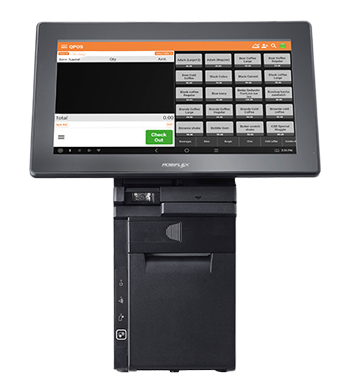
- Hardware compatibility
- Customer support
- Scalability
- Overall cost
A free trial can be particularly useful because it allows your team to test the software in a real restaurant environment before committing.
Conclusion
Efficient billing is an important part of successful restaurant operations. The right restaurant billing software can help businesses streamline orders, generate bills faster, manage tables, monitor sales, and reduce manual work.
QPOS restaurant billing software provides a solution for restaurants looking to bring their billing and operational activities into a more organized digital system.
If you are considering upgrading from traditional billing, the QPOS 7-day free trial gives you an opportunity to explore the software and determine whether it is the right fit for your restaurant.
Ready to simplify restaurant billing? Try QPOS free for 7 days and discover how digital restaurant billing can make your operations more efficient.
About Authour

Stephen Athokpam
Stephen Athokpam is a POS Software and Retail Systems Specialist at QPOS
with hands-on experience helping 2,000+ restaurants streamline billing, kitchen operations, and inventory.
He writes on cloud POS, Swiggy/Zomato integration, and checkout automation for QSRs, cafes, and restaurant chains across India.