7 Restaurant Billing Formats in QPOS
Written by: Stephen Athokpam, POS Software and Retail Systems Specialist , QPOS
Published: 14 October 2022
Last Updated: 18 August 2026
Restaurant billing formats define how item prices, GST, payment details and business information appear on a customer bill.
QPOS provides 7 billing formats, including GST-inclusive and GST-exclusive options, to help restaurants generate bills based on their operational requirements. These billing features are part of QPOS’s Restaurant Billing Management System, which also supports other day-to-day restaurant operations.
What Are Restaurant Billing Formats?
Restaurant billing formats determine how information such as item prices, GST, payment mode, bill number, FSSAI licence and restaurant details are displayed on a printed or digital bill. The right format helps restaurants present billing information clearly and consistently. Restaurants can manage these billing requirements using Restaurant POS Software, along with other operations such as orders, payments and inventory.
What are the 7 Restaurant Billing Formats in QPOS?
| Billing Format | GST Treatment | Key Details |
|---|---|---|
| Space Saver | GST breakup not shown | Simple and fast bill |
| Quick Bill | Based on checkout configuration | Quick billing format |
| Format 1 | GST breakup | GST details in footer |
| Format 2 | Exclusive GST on items, inclusive grand total | Payment mode + GST breakup |
| Format 3 | Inclusive GST | GST included in item and grand total |
| Format 4 | Exclusive GST | GST breakup + FSSAI details |
| Format 5 | Inclusive GST | “GST is Already included in item prices” |
What Are the Different Restaurant Billing Formats in QPOS?
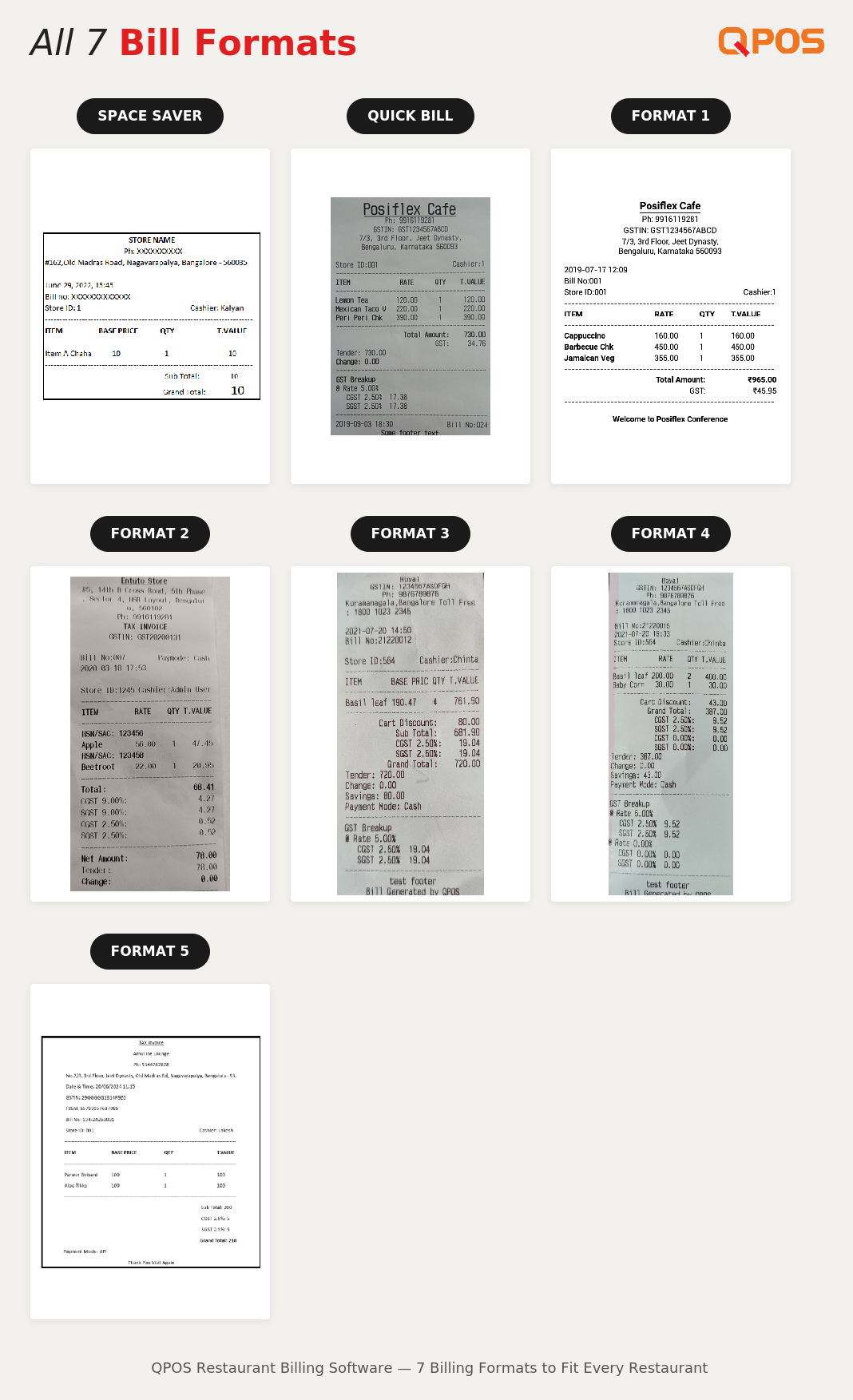
Space Saver Billing Format
- The Store name, Phone number, Address and other details will be printed.
- We don’t have GST Breakups in the Space Saver.
- It is simple and fast generated bill.
- Date, Time and Bill number will be part of header.
Quick Bill Format
- On the click of item in the menu, The Store name, address and others gets printed.
- Once we give print or settle the bill in the check out, the complete bill will be generated.
- The Date and Time and Bill number will be part of footer.
Format 1 – Restaurant Billing Format
- The Store name, Phone number, Address and others will be printed post settling the bill.
- GST Breakups are part of the footer.
- Date, Time and Bill number will be part of the Header.
Format 2 – GST-Exclusive Item Pricing
- The Store name, Phone number, Address and other details will be printed post settling the bill.
- GST Breakups and Payment mode will be part of the footer.
- Date, Time and Bill number will be part of the Header.
- In Format 2, each product price is exclusive of GST and Grand Total is Inclusive of GST.
- HSN/SAC code are included in the format 2. (Right now it is Not Available)
Format 3 – GST-Inclusive Billing
- The Store name, Phone number, Address and other details will be printed post settling the bill.
- GST Breakups will be part of the footer and
- Date, Time, Bill number and Payment mode will be part of the header.
- In Format 3, The price of each product is inclusive of GST and so is the Grand Total.
- HSN/SAC code are included in the format 3. (Right now it is Not Available)
Format 4 – GST-Exclusive Billing with GST Breakup
- The Store name, Phone number, Address and other details will be printed post settling the bill.
- GST Breakups will be at the footer. Date and Time and Bill number will be at the header. Payment mode will be immediately above the GST Breakups.
- In Format 4, Each item price is exclusive of GST.
- The GST Number will be generated at the header. FSSAI license will be generated at the footer.
Format 5 – GST-Inclusive Billing
- The Store name, Phone number, Address and other details will be printed post settling the bill.
- GST Breakups will be at the footer.
- Date and Time and Bill number will be at the header. Payment mode will be immediately above the GST Breakups.
- In Format 5, each item price is inclusive of GST.
- The GST Number will be generated at the header. FSSAI license will be generated at the footer.
- In the format 5, “GST is Already included in item prices” message will be printed before footer.
How to Change the Billing Format in QPOS?
Watch this step-by-step video to learn how to change the billing format in QPOS.
Manage Restaurant Billing with QPOS
QPOS is a Restaurant Billing Software designed to help restaurants manage billing, table operations, online orders, payments and other day-to-day operations from one platform.
Looking for Restaurant Billing Software?
Manage restaurant billing, GST, orders, inventory and reports with QPOS restaurant POS software.
Frequently Asked Questions About Restaurant Billing Formats
1. What is a restaurant billing format?
A restaurant billing format determines how item prices, GST, payment information and restaurant details are displayed on a customer bill.
2. How many billing formats are available in QPOS?
QPOS currently provides 7 billing formats, including Space Saver, Quick Bill and Formats 1 to 5.
3. Does QPOS support GST-inclusive billing?
Yes. QPOS provides billing formats where item prices can be inclusive of GST, including Format 5.
4. Does QPOS support GST-exclusive billing?
Yes. QPOS provides billing formats where item prices can be inclusive of GST, including Format 5.
5.Does QPOS support GST-exclusive billing?
Yes. Format 4 provide GST-exclusive billing options.
6. Which QPOS billing format should I use?
The appropriate format depends on how your restaurant wants to display GST, item prices, payment information and other bill details.
About Author

Stephen Athokpam
Stephen Athokpam is a POS Software and Retail Systems Specialist at QPOS
with hands-on experience helping 2,000+ restaurants streamline billing, kitchen operations, and inventory.
He writes on cloud POS, Swiggy/Zomato integration, and checkout automation for QSRs, cafes, and restaurant chains across India.