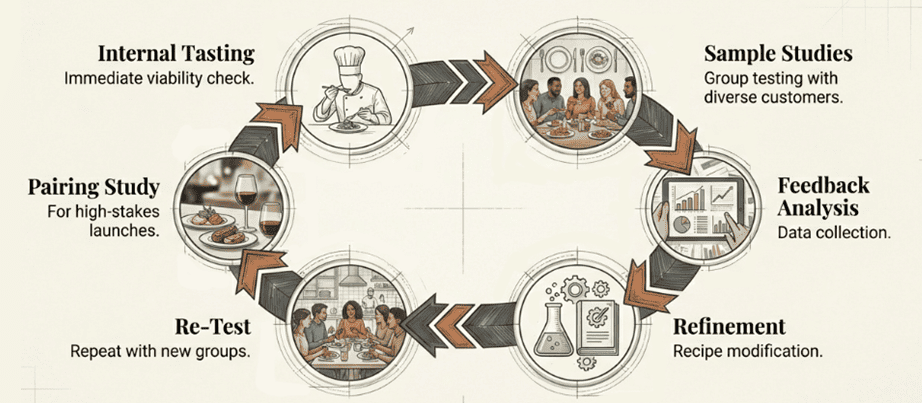
Step-by-step restaurant menu pilot testing process including internal tasting, sample studies, feedback analysis, refinement, and re-testing

Learn How to Test New Menu Items at Your Restaurant

Discover Menu Engineering Tips In the Light of Global Food Trends 2026

It’s February 2026. The last month of Q1 2026 will end before we know it. We are returning to our blogs after a brief hiatus to urgently remind F&B business owners that the time to make the best of 2026 is now or never—  

Let’s begin our exchange during this year with one of the most important pillars of the industry: menu engineering and launching new menu items in restaurants. 

Setting the Stage for a Successful Year: Discover Key Ideas Covered

If you are a seasoned food outlet owner, the need of the hour is to go beyond proficiency in menu engineering to mastering the skill.  

On the other hand, for those starting their F&B ventures or those struggling to set up a data-driven, ERP-powered restaurant workflow, 2026 could be a good start towards a robust growth trajectory. 

To learn what the global F&B landscape of 2026 is all about, keep reading this blog as we explore: 

  • Snapshot of the Global Food Trends 2026 and the F&B Outlet Categories They Favour 
  • Best Practices and Key Considerations Surrounding How to Add Items to a Restaurant Menu 
  • The Role of Restaurant ERPs with Robust POS Modules, Such as QPOS, in Smooth Menu Engineering 

Want to gain insights into successfully launching new menu items in restaurants you manage? A robust restaurant ERP platform is the ideal tool for tracking and analysing performance, accounting for expenses, and more!

Curious about How to Add Items to a Restaurant Menu? Embrace Trends—That’s Step 1

Does Your Menu Already Fit the Trends? Discover What to Modify, Enhance, & Adopt 

The vital and interesting link between trends and popular strategies for launching new menu items in restaurants is that opting for in-demand dishes and culinary experiences is not just one of the best practices but also one of the most intuitive ones. Check out the table below to learn what the F&B sector players are busy implementing in their menus in 2026 and where your niche as a restaurateur fits. 

These insights have been derived from a wide range of resources, including news articles, thought leadership pieces, and the latest Michelin Guide, among other credible sources. 

Trend  Key Attributes  Players 
Hyperlocal & Seasonal 
  • Regular menu updates to accommodate regional dishes from various corners of the country (India)/world, especially festival specials, as well as summer, monsoon, or winter delights  
  • Exotic flavours 
  • Travel and theme-inspired curated menus 
  • Fine dining restaurants 
  • High-end cafes (specials) 
  • Juice Bars/ Food Trucks* (seasonal drinks) 
  • Multi-cuisine restaurants (specials) 
  • Bistros 
Fusion & New Takes on Popular Dishes 
  • Traditional dishes, from India and other parts of the world, given a global and Indian twist 
  • New additions to the familiar flavour profile 
  • Travel and theme-inspired curated menus 
  • Fine dining restaurants 
  • High-end cafes (specials) 
  • QSRs and QSR chains 
  • Cloud kitchens targeting a premium customer range* 
  • Bistros 
Premium Experience  (preferably close to home) 
  • Smooth customer journey 
  • Responsive service 
  • Immersive ambience 
  • Quality ingredients (locally-sourced; organic) 
  • Wholesome and balanced flavour profile 
  • Travel and theme-inspired curated menus 
  • Fine dining restaurants 
  • High-end cafes (specials) 
  • Well-known multi-cuisine restaurant franchises 
Complex Flavours 
  • Smokiness 
  • Bitterness and Umami 
  • Deep, rich aroma 
  • Fine dining restaurants 
  • High-end cafes (specials) 
  • Well-known multi-cuisine restaurant franchises 
  • Tandoor/barbeque/grill-focused outlets of various scales 
  • Sushi Bars 
  • Pan-Asian restaurants 
Focus on Protein Intake & Health-First Menu Engineering 
  • Protein-rich, balanced meals beyond supplementation 
  • Balance between healthy properties and taste 
  • Reasonable portion sizes 
  • Fine dining restaurants 
  • High-end cafes 
  • Multi-cuisine restaurants (and franchises) 
  • Bistros 
Immersive, Long-Interval Dining Experience 
  • Slow-cooked dishes 
  • Multi-course meals 
  • Beautiful ambience 
  • Attentive service 
  • Fine dining restaurants and other establishments engaging with haute cuisine 
*To ensure comprehensive guidance to all business models, we have also included businesses that don’t necessarily cater to the dine-in crowd. 

Key Insights: Interestingly, some of the global food trends of 2026 are the same as the widely followed tactics used in the restaurant sector for attracting a broad customer base:  

  • Fusion cuisine (which may sometimes mean introducing a Creole dish without experimenting with the recipe) 
  • Reinterpretation of well-loved dishes 

Looking for a comprehensive ERP platform? QPOS, being a restaurant industry-specific platform, can be the ideal operations management software for your restaurant, particularly if You are in the middle of figuring out how to add new items to the restaurant menu.

What Are the Other Best Practices for Launching New Menu Items in Restaurants?

We have listed some common menu engineering strategies for business owners who are confused about how to add new items to a restaurant menu or are taking up the exercise for the very first time. To further facilitate a smooth menu update, we have paired each strategy with key considerations. 

The following three sections are especially helpful if the business owner has no tailored report guiding the menu change: 

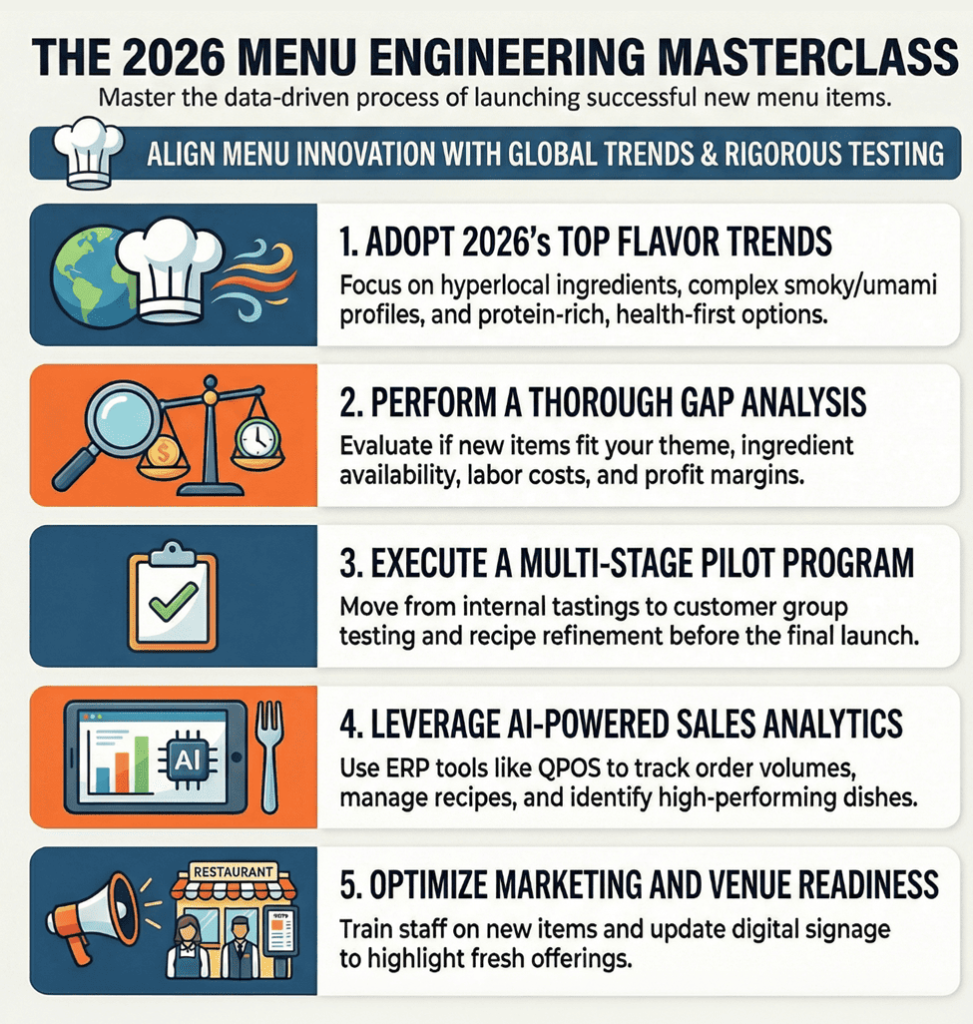
  1. Pilot Programs After Gap Analysis Against Listed Menu Items & Trends 

Here is a set of questions and corresponding examples illustrating the roadmap to discovering what your restaurant model can adopt—or amplify—given the trends:

Which trending flavours go with your restaurant? Step 1 of Gap Analysis 

Smoky grills, charred edges, bitterness, umami, and complex aromas are projected to be the dominant food cravings of the year. 

Hence, if your restaurant’s menu leans towards classic Indian dishes, then the following specials could be a hit: 

  • Tandoor-related offerings boasting rich smokiness 
  • Bitter dishes—coupled with traditional, hyperlocal, and sumptuous meals. Example: a filling Bengali thali with sukto (creamy and bitter vegetable stew) or a large Gujrati platter with karela nu saag as a palate cleanser 
  • Seasonal or festive food, including an Onam thali and the famous winter desserts, malaiyo (a foamy, melt-in-the-mouth, delicate sweet made thanks to dew falling into the milk vessel left overnight under the wintry sky) from Uttar Pradesh
  • Fusion dishes, combining the best of two or more Indian delicacies—or sporting a continental take on the traditional favourite

Similarly, a Pan-Asian restaurant chain launching new menu items in restaurants under the franchise could: 

  • Double down on Korean barbecue for foodies in search of smoky, grilled, tender meats, veggies, and more 
  • Experiment with sushi for those seeking the savoury uniqueness of umami, while also craving an Indian touch in their meal 

These dishes in both examples are merely illustrative and barely scratch the surface of both great cuisines and the vast scope of culinary creativity. 

Key Consideration: It is important to note that even if certain dishes or campaigns drive great footfall in Pan-Asian outlets, the same may not apply to Indian restaurants, and vice versa. 

Conclusion: Menu upgrades aligned with trends should be customised to the business model, rather than adopting a one-size-fits-all approach.

Flavour aside, how to add new items to a restaurant menu based on the trends? Step 2 of Gap Analysis 

While brainstorming new menu items after a thorough gap analysis, trends and public demand should not be the only considerations. In other words, besides checking for whether the dish fits your restaurant theme and the cuisine you serve, you should account for: 

  • Ingredients used in the trending item vs. those readily available at your restaurant 
  • Cost of the new dish 
  • The reasonable profit margin on the new menu item (a range, most often, instead of a solid number) 
  • Labour cost, particularly in terms of hours spent

Looking for an ERP with on-demand data recall? Embrace the AI-driven edge QPOS offers.

How to run a pilot menu before launching a new menu item in restaurants you manage?

The pointers below offer a snapshot of the process you can follow to test prospective menu items:

  • Conducting an internal tasting round for immediate evaluation of the item’s viability  
  • Sample studies and group testing to gauge how a wide range of customers may react to the dishes 
  • Collecting feedback from the study participants 
  • Modifying the recipe if the feedback is overall positive, but a common set of suggestions was added 
  • Repeating the group testing with different individuals, but with an identical sample in terms of variations 
  • Following the steps above for every dish, and if the menu launch is high-stakes, then carrying out a more elaborate study on how the dishes can be paired 
Menu engineering strategy for 2026 showing flavor trends, gap analysis, pilot program, AI analytics, and restaurant marketing optimization

2. Scraping Review Sites, Customer Feedback, & Sales Data 

Apart from trends, new items or combos can be ideated by crunching the following: 

  • Customer feedback during billing 
  • Reviews across platforms such as Yelp, Google Reviews, and various listing sites 
  • Order volume of dishes and combos across dine-in and online orders (from restaurant website, QSR’s own app, or food aggregator platforms) 

Key Takeaway: These insights can be reverse-engineered into new dishes.  

Important Things to Note: From a different standpoint, the menu upgrade exercise should emphasise new items as much as rethinking combos and enhancing the quality of the items carried over to the new menu. This is because dining out is a comprehensive experience requiring a holistic attention to detail. 

Given that both analyses are useful, are you wondering when to depend on trends and when on customer feedback? Here is a brief guide for all those who are working to discover how to add items to a restaurant menu: 

When You Should Primarily Depend on Trends When Implementing Feedback Is Vital 
  • Portion sizes* 
  • Health trends 
  • Flavour trends 
  • Shift in ambience preference 
  • Combos involving existing and new menu items 
  • Competitor analysis 
  • Portion Sizes* 
  • Feedback on current menu items 
  • Combos of existing items 
  • Sales projections (also requires external data) 
  • Reverse-engineering new items based on feedback 
*Relevant from both points of view to balance customer demand with competitiveness 

3. Marketing New Menu Items and Venue-Readiness for New Rollouts 

Here are some critical tips for you to amplify the traction of the latest menu after launching new menu items in a restaurant: 

  • Leveraging social media, e-mail marketing, and SMS marketing to update customers about the exciting changes in the menu 
  • Launch offers to promote the new additions 
  • Training the staff to not only prepare the new dishes but also suggest them readily when the servers approach the guests at the table 
  • Updating the digital signage to highlight the new items and combos (the combos may include items that have on the menu for a long time, as long as the bundled offer is new) 
  • Highlight the new offerings on the specials board outside the restaurant 

Reimagining the menu with a strategic visual layout that draws attention to the new dishes and combos Interestingly, the action items suggested across the three sections can be largely simplified, if not completely automated, with the help of an efficient, all-in-one restaurant ERP platform such as QPOS, which has, over the years, emerged as a leading industry player in the restaurant POS (software) market. 

Are you curious about the difference QPOS can make? Or, do you want to know how to add a new item to a restaurant menu using QPOS restaurant ERP? Find out in the subsequent portion of this blog. 

To understand the excellence we strive for, discover the wide range of F&B players QPOS serves.

What Role Do Restaurant ERP Platforms Like QPOS Play in Assisting Menu Expansion? Discover Here!

With QPOS, launching new menu items in restaurants you manage will turn out to be an effortless initiative, thanks to the features and capabilities listed below: 

  • Analysing sales data and other datasets, as well as making projections, can be simplified using the ERP’s AI-powered Analytics module. This includes identifying the profit margin per dish and the popularity of new and old dishes, as well as integrating feedback during pilots and post-launch, among other critical decision-making instances. 
  • The Recipe Management module helps brainstorm new items within the boundaries of available ingredients. 
  • Editing the menu across platforms becomes a repetition-free process with QPOS. 
  • The cloud ERP enables franchise management, thereby launching menus/ menu items across outlets via a single touchpoint. 
  • We, at QPOS, have a solid track record of integrating the ERP platform with accounting software and CRMs, among others. 

Additionally, our ERP helps restaurants with a robust, POS-hardware-powered workflow for smoothly tracking inventory end-to-end, alongside streamlining other restaurant management workflows. 

Curious to know how else we can empower you? Contact us now, and one of our executives will get in touch with you as soon as possible! 

Quick Recap Before Wrapping Up

QPOS Brochure
All-in-one POS solution for your restaurant or retail business
QPOS Brochure
All-in-one POS solution for your restaurant or retail business
QPOS Brochure
All-in-one POS solution for your restaurant or retail business
QPOS Brochure
All-in-one POS solution for your restaurant or retail business
QPOS Brochure
All-in-one POS solution for your restaurant or retail business
QPOS Brochure
All-in-one POS solution for your restaurant or retail business
QPOS Brochure
All-in-one POS solution for your restaurant or retail business
QPOS Brochure
All-in-one POS solution for your restaurant or retail business
QPOS Brochure
All-in-one POS solution for your restaurant or retail business
QPOS Brochure
All-in-one POS solution for your restaurant or retail business
QPOS Brochure
All-in-one POS solution for your restaurant or retail business
QPOS Brochure
All-in-one POS solution for your restaurant or retail business
QPOS Brochure
All-in-one POS solution for your restaurant or retail business
QPOS Brochure
All-in-one POS solution for your restaurant or retail business
QPOS Brochure
All-in-one POS solution for your restaurant or retail business
QPOS Brochure
All-in-one POS solution for your restaurant or retail business
QPOS Brochure
All-in-one POS solution for your restaurant or retail business
QPOS Brochure
All-in-one POS solution for your restaurant or retail business
QPOS Brochure
All-in-one POS solution for your restaurant or retail business
QPOS Brochure
All-in-one POS solution for your restaurant or retail business
QPOS Brochure
All-in-one POS solution for your restaurant or retail business
QPOS Brochure
All-in-one POS solution for your restaurant or retail business
QPOS Brochure
All-in-one POS solution for your restaurant or retail business
QPOS Brochure
All-in-one POS solution for your restaurant or retail business
QPOS Brochure
All-in-one POS solution for your restaurant or retail business
QPOS Brochure
All-in-one POS solution for your restaurant or retail business
QPOS Brochure
All-in-one POS solution for your restaurant or retail business
QPOS Brochure
All-in-one POS solution for your restaurant or retail business
QPOS Brochure
All-in-one POS solution for your restaurant or retail business
QPOS Brochure
All-in-one POS solution for your restaurant or retail business
QPOS Brochure
All-in-one POS solution for your restaurant or retail business
QPOS Brochure
All-in-one POS solution for your restaurant or retail business
QPOS Brochure
All-in-one POS solution for your restaurant or retail business
QPOS Brochure
All-in-one POS solution for your restaurant or retail business
QPOS Brochure
All-in-one POS solution for your restaurant or retail business
QPOS Brochure
All-in-one POS solution for your restaurant or retail business
Get in touch
Fill the form to open New Franchise
Get in touch
Fill the form to open New Franchise
Get in touch
Fill the form to open New Franchise
Get in touch
Fill the form to open New Franchise
Get in touch
Fill the form to open New Franchise
Get in touch
Fill the form to open New Franchise
Get in touch
Fill the form to open New Franchise
Get in touch
Fill the form to open New Franchise
Get in touch
Fill the form to open New Franchise
Get in touch
Fill the form to open New Franchise
QPOS Brochure
All-in-one POS solution for your restaurant or retail business
QPOS Brochure
All-in-one POS solution for your restaurant or retail business
QPOS Brochure
All-in-one POS solution for your restaurant or retail business
QPOS Brochure
All-in-one POS solution for your restaurant or retail business
QPOS Brochure
All-in-one POS solution for your restaurant or retail business
QPOS Brochure
All-in-one POS solution for your restaurant or retail business

PS 3616 G2 White

Intel Elkhart Lake Celeron J6412, up to 2.60 GHz, 1.5M Cache
DDR4 SO-DIMM x 1, max. 16GB
M.2 connector (SATA Signal Only) x 1
Windows 10 IoT 64 bits
VGA x 1, 12V support for Posiflex monitors
1, control 2 CR via optional Y-cable, supporting 24V cash drawer
MSR; iButton; RFID; Fingerprint Sensor; KeypadNon-touch TFT USB LCD: 7"/9.7"
5, USB 3.0 x 2+ USB 2.0 x 2 (on I/O plate) + USB 2.0 x 1 (on the top)

RTP-4

ARM Cortex-A55, Quad-Core 2.0GHz
Android 13
4GB RAM + 64GB ROM
8GB RAM + 128GB ROM (optional)
2 × USB3.0 + 3 × USB2.0
15.6" HD 1366×768
15.6" FHD 1920×1080 (optional)
Capacitive Multi-Touch Screen
10.1" 1024×600 (optional)
6 × USB
1 × Headset Jack
Interface 1 × φ5.5mm DC Jack
Power key
Tone, Power indicator
2 × Speaker (2W)
380mm × 186mm × 288mm
Ethernet TCP/IP 1000M
2.4 & 5GHz dual-band Wi-Fi
Power Adapter (12V 4A) × 1
Face Recognition Camera
MSR
NFC

Rp -i1H

Cortex-A53 Octa-core 2.3GHz
Android 14
3GB RAM + 32GB ROM
1 x Micro SD Card (up to 128GB)
5.5" HD+, IPS 720×1440
Industrial grade Capacitive Touch Screen
Removable Lithium Battery, 7.7V / 3000mAh
157.8×75.5×17.3mm
345g (with battery)
1 × Type C, USB 2.0, Support OTG With Rubber Plug
1 × Power Key, 1 × Volume + / Scan Key, 1 × Volume - Key
Speaker
Built-in 58mm Thermal Printer
Print Speed: 80mm/s
Paper Roll: Φ40mm
1D and 2D Barcodes Reader (optional)
Newland CM30
Rear 5MP AF Camera, With Flash LED, Support 1D / 2D
Support ISO15693, ISO14443A/B, Mifare card, Felica card
FDD-LTE: B1 / B2 / B3 / B4 / B5 / B7 / B8 / B20 / B28
BT5.3 + BR/EDR + BLE
GPS L1, GLONASS
5%~95% RH (No condensation)
Power Adaptor ×1, USB Cable ×1, Battery ×1
Hand strap, Protective Case, Protector Film

Rp -6s

Android 7.1 OS
5.99” IPS PCAP – 1440×720
Quad Core Snapdragon A-53, 1.4Ghz
16 GB Storage
2GB System Memory
True-flat PCAP touch function with multi-touch support
215.2 x 83 x 17(mm) in Dimensions
360 Grams in weight without receipt roll
Built-in NFC | Wi-Fi | Bluetooth | GPS | GSM
Built-in 2“Detachable Built-in Printer w/auto cutter, 203 mm/sec
1D, 2D, Matrix & QR code Scanner
5MP Camera with Manual & AF
USB C | USB Port | OTG USB | 4G/LTE | CR Port | LAN Port
Base Cradle or Power adaptor
Full charge in 4 hours.
Standby Time 10 Days

Rp -15

Android OS (Version 9.0)
15.6” FHD – 1920×1080 - Capacitive multitouch screen
Kryo 260, Octa Core 2.2 GHz
4GB RAM
64 GB ROM
Dimension 430 * 382 * 215 mm
Weight 4.5 kg
Colourful RBG TFT Screen, 16:9 wide screen image format
Wi-Fi 2.4G/5.0GHz IEEE 802.11 a/b/g/n/ac
Bluetooth BT BLE 5.0
Operating Temperature 0°C - 50°C, 20%RH - 90%RH (Equipped with SSD)
Storage Temperature -20°C ~ 60°C
12KV Electrostatic Protection
USB Port | CR Port | LAN Port | Serial Port | UPS Port | Mini USG OTG | TF Slot

HS-2414A

Android 7.1 OS
14” TFT LCD Display – 1366×768
IP65 on front panel
Quad Core Processor, 1.20GHz
16 GB Storage
2GB System Memory DDR3
24V/60W Power Supply
True-flat PCAP touch function with multi-touch support
371.5 x 198 x 473(mm) in Dimensions
5.8 Kg in weight
Built-in MSR | RFID Reader | Wi-Fi
Built-in 3" Detachable Built-in Printer w/auto cutter, 250 mm/sec
2D Barcode Scanner
Fingerprint Sensor
USB Port | OTG USB | 4G/LTE | CR Port | LAN Port | Serial Port | UPS Port | Display Port.

Allen Roy

Work Experience – 4 Years

Freelance Photographer

Photographer’s Assistant

Education
Bachelor of Art in Digital Photography
University of San Francisco

Allen Roy

Work Experience – 4 Years

Freelance Photographer

Photographer’s Assistant

Education
Bachelor of Art in Digital Photography
University of San Francisco